---
title: Pricing Automation
description: Using Profit Strategies & Pricing Methods to determine your Markup Calculation within EBIS 5
---
[Skip to content](https://support.ebiscloud.com/pricing-automation#main-content)

- [Home](https://support.ebiscloud.com/)
- [Feature Release Notes](https://www.ebiscloud.com/feature_release_notes)
Open main navigation
Close main navigation
- [Home](https://support.ebiscloud.com/)
- [Feature Release Notes](https://www.ebiscloud.com/feature_release_notes)
How can we help you?
- There are no suggestions because the search field is empty.
1. [Help Center](https://support.ebiscloud.com/?hsLang=en)
2. [Billing](https://support.ebiscloud.com/billing?hsLang=en)
# Pricing Automation
## Using Profit Strategies & Pricing Methods to determine your Markup Calculation within EBIS 5
### Introduction
EBIS 5 comes preconfigured with the **Parts Matrix** *disabled***;** This matrix is where you can input cost ranges that in turn utilize a lesser known yet more robust formula when automating the parts markup calculation (over cost) for you. This article will explain this method, provide insight into determining whether it's right for you, and provide alternatives.
### **Parts Matrix Setup:**
*(Cost Ranges & Cost Markup Percentages)*
**NOTE:** These cost ranges have to be input manually
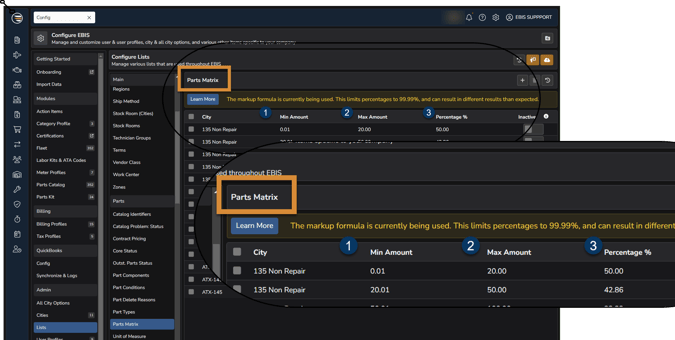
> EBIS 5 Path: Config \> Admin \> Lists \> Parts \> Parts Matrix
- Creating cost ranges on a city-by-city basis
- Input Applicable City then **↴**
1. 1. 1. 1. Choose Minimum currency value of cost range 1
2. Choose Maximum currency value of cost range 1
3. Choose Markup % of cost range 1
- Repeat for subsequent ranges **↺ [Parts Matrix Example](https://docs.google.com/spreadsheets/d/1I_RRI1IpCLTg0M3Xeb5DY7gfX-naXC1Hcc_Qkii1QTE/edit?usp=sharing)**
### **Turning Off Parts Matrix:**
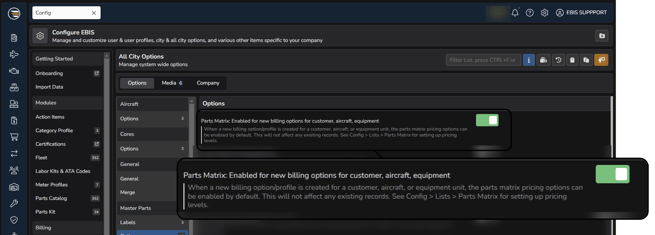
> EBIS 5 Path: Config \> Admin \> All City Options \> Master Parts \> Options
****
### **Markup Formula Calculation:**
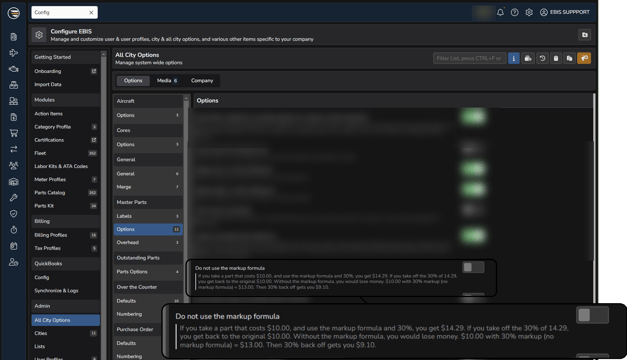
> EBIS 5 Path: Config \> Admin \> All City Options \> Master Parts \> Options
- Disabling the markup formula will revert the Parts Matrix to use a *Cost + (Cost \* %)* Parts Markup Calculation Method.
### Markup ≠ Profit Margin
EBIS 5 provides **2** **Pricing Methods** that are based off of **2** **Gross Profit** strategies you can choose from.
### **Gross Profit Strategies:**
**Gross Profit Markup** =(Selling Price - Cost) / Cost
**Gross Profit Margin** = (Selling Price - Cost) / Selling Price
### **Pricing Methods:**
**Markup Method :** Selling price = Cost + (Cost \* %)
**Margin Method :** Selling price = Cost / (1 \* %)
EBIS 5 utilizes the **Gross Profit Margin** strategy by default and enables the markup formula to provide the most value for our customers, but has the flexibility to turn off that default method and revert to using the **Gross Profit Markup** strategy, which is more well known.
### What the difference?
To ensure optimum profit on parts you sell, you must first factor in the selling price of the part (*revenue*) in relation to the *cost* of the part . Typically with a simple pricing markup calculation (cost + %) first references the cost of the part being sold then adds a percentage on top of that cost to decide the *selling price*, instead of referencing the selling priceto decide *which percentage to add* in relation to that part's cost is required to ensure you meet the profit margin you are trying to achieve.
### "The Markup Formula"
If you take a part that costs $10.00, and use the markup formula and plug in 30%, you get $14.29. If you take 30% off of 14.29, you get back to the original $10.00. Without the markup formula, you would lose money. $10.00 with a 30% markup (no markup formula) = $13.00. Then taking 30% off of $13.00 only gets you $9.10.
**NOTE:** While using the markup formula, the maximum percentage you can add is 99.99% - anything more will result in a negative number due to the formula
### [Formula Examples](https://docs.google.com/spreadsheets/d/1I_RRI1IpCLTg0M3Xeb5DY7gfX-naXC1Hcc_Qkii1QTE/edit?usp=sharing)
If *using* the markup formula, the calculation is:
COST / (1 - percent) (ex. $10 / (1 - .3) = $10 / .7 = $14.29)
If *not using* the markup formula, the calculation is:
COST \* (1 + percent) (ex. $10 \* (1 + .3) = $10 \* 1.3 = $13.00)
- [Onboarding](https://support.ebiscloud.com/onboarding?hsLang=en#main-content)
- [All New EBIS Customers](https://support.ebiscloud.com/onboarding?hsLang=en#all-new-ebis-customers)
- [Existing Customers - EBIS 3.2 to 5 Migration](https://support.ebiscloud.com/onboarding?hsLang=en#existing-customers-ebis-3-2-to-5-migration)
- [EBIS 5 Training](https://support.ebiscloud.com/onboarding?hsLang=en#ebis-5-training)
- [MRO Specific](https://support.ebiscloud.com/mro-specific?hsLang=en#main-content)
- [Work Orders](https://support.ebiscloud.com/mro-specific?hsLang=en#work-orders)
- [3.2 to 5](https://support.ebiscloud.com/mro-specific?hsLang=en#3-2-to-5)
- [Parts](https://support.ebiscloud.com/mro-specific?hsLang=en#parts)
- [Billing](https://support.ebiscloud.com/mro-specific?hsLang=en#billing)
- [Configuration](https://support.ebiscloud.com/mro-specific?hsLang=en#configuration)
- [Cores / Rotables](https://support.ebiscloud.com/mro-specific?hsLang=en#cores-rotables)
- [Aircraft](https://support.ebiscloud.com/mro-specific?hsLang=en#aircraft)
- [Tools](https://support.ebiscloud.com/mro-specific?hsLang=en#tools)
- [QuickBooks Online Integration (New)](https://support.ebiscloud.com/quickbooks-online-integration-new?hsLang=en)
- [Work Order](https://support.ebiscloud.com/work-order?hsLang=en)
- [Customer Approvals](https://support.ebiscloud.com/customer-approvals?hsLang=en#main-content)
- [Getting Started](https://support.ebiscloud.com/customer-approvals?hsLang=en#getting-started)
- [Using Customer Approvals](https://support.ebiscloud.com/customer-approvals?hsLang=en#using-customer-approvals)
- [Customer Experience](https://support.ebiscloud.com/customer-approvals?hsLang=en#customer-experience)
- [Troubleshooting & FAQs](https://support.ebiscloud.com/customer-approvals?hsLang=en#troubleshooting-faqs)
- [Aircraft](https://support.ebiscloud.com/aircraft?hsLang=en#main-content)
- [Getting Started with the Aircraft Module](https://support.ebiscloud.com/aircraft?hsLang=en#getting-started-with-the-aircraft-module)
- [Creating & Configuring an Aircraft or Fleet](https://support.ebiscloud.com/aircraft?hsLang=en#creating-configuring-an-aircraft-or-fleet)
- [Viewing & Updating Meter Readings (Aircraft Times)](https://support.ebiscloud.com/aircraft?hsLang=en#viewing-updating-meter-readings-aircraft-times)
- [Creating & Configuring Meter Profiles](https://support.ebiscloud.com/aircraft?hsLang=en#creating-configuring-meter-profiles)
- [Reviewing Historical Work Orders, Parts & OSRs on Aircraft](https://support.ebiscloud.com/aircraft?hsLang=en#reviewing-historical-work-orders-parts-osrs-on-aircraft)
- [Managing Deferred / Continued Maintenance Items](https://support.ebiscloud.com/aircraft?hsLang=en#managing-deferred-continued-maintenance-items)
- [Managing Recurring Maintenance Items with the Compliance Module](https://support.ebiscloud.com/aircraft?hsLang=en#managing-recurring-maintenance-items-with-the-compliance-module)
- [Setting Custom Pricing & Rates for Specific Aircraft](https://support.ebiscloud.com/aircraft?hsLang=en#setting-custom-pricing-rates-for-specific-aircraft)
- [Ordering Shop Supplies Using a “Shop Aircraft”](https://support.ebiscloud.com/aircraft?hsLang=en#ordering-shop-supplies-using-a-shop-aircraft)
- [Viewing & Managing Engine Compression Readings](https://support.ebiscloud.com/aircraft?hsLang=en#viewing-managing-engine-compression-readings)
- [Aircraft Module Fields, Definitions & Config Settings](https://support.ebiscloud.com/aircraft?hsLang=en#aircraft-module-fields-definitions-config-settings)
- [Advanced](https://support.ebiscloud.com/advanced?hsLang=en#main-content)
- [Errors](https://support.ebiscloud.com/advanced?hsLang=en#errors)
- [EBis 3.2 (Legacy)](https://support.ebiscloud.com/ebis-3-2-legacy?hsLang=en#main-content)
- [Work Orders](https://support.ebiscloud.com/ebis-3-2-legacy?hsLang=en#work-orders)
- [Pricing](https://support.ebiscloud.com/ebis-3-2-legacy?hsLang=en#pricing)
- [Troubleshooting](https://support.ebiscloud.com/ebis-3-2-legacy?hsLang=en#troubleshooting)
- [GSE EAM & CMMS](https://support.ebiscloud.com/gse-eam-cmms?hsLang=en)
- [Billing](https://support.ebiscloud.com/billing?hsLang=en#main-content)
- [City Config](https://support.ebiscloud.com/billing?hsLang=en#city-config)
- [EBIS Subscription Management](https://support.ebiscloud.com/billing?hsLang=en#ebis-subscription-management)
- [Best Practices](https://support.ebiscloud.com/best-practices?hsLang=en)
- [Parts](https://support.ebiscloud.com/parts?hsLang=en#main-content)
- [Cores](https://support.ebiscloud.com/parts?hsLang=en#cores)
- [Special Pricing](https://support.ebiscloud.com/parts?hsLang=en#special-pricing)
- [ADA Dashboards & Reporting](https://support.ebiscloud.com/ada-dashboards-reporting?hsLang=en#main-content)
- [General Reporting](https://support.ebiscloud.com/ada-dashboards-reporting?hsLang=en#general-reporting)
- [ADA Dashboards](https://support.ebiscloud.com/ada-dashboards-reporting?hsLang=en#ada-dashboards)
- [Power BI Connector](https://support.ebiscloud.com/ada-dashboards-reporting?hsLang=en#power-bi-connector)
- [General Configuration](https://support.ebiscloud.com/general-configuration?hsLang=en#main-content)
- [Addresses](https://support.ebiscloud.com/general-configuration?hsLang=en#addresses)
- [Quickbooks Imports with Transaction Pro](https://support.ebiscloud.com/quickbooks-imports-with-transaction-pro?hsLang=en)
- [New Releases](https://support.ebiscloud.com/new-releases?hsLang=en)
[](https://www.ebiscloud.com?hsLang=en)
[mailto:email@email.com](mailto:email@email.com)
Copyright © 2025, EBIS - Tronair