---
title: Work Order Item Signoffs
description: How to configure W/O item signoffs
---
[Skip to content](https://support.ebiscloud.com/mro/wo-item-sign-offs#main-content)

- [Home](https://support.ebiscloud.com/)
- [Feature Release Notes](https://www.ebiscloud.com/feature_release_notes)
Open main navigation
Close main navigation
- [Home](https://support.ebiscloud.com/)
- [Feature Release Notes](https://www.ebiscloud.com/feature_release_notes)
How can we help you?
- There are no suggestions because the search field is empty.
1. [Help Center](https://support.ebiscloud.com/?hsLang=en)
2. [MRO Specific](https://support.ebiscloud.com/mro-specific?hsLang=en)
3. [Work Orders](https://support.ebiscloud.com/mro-specific?hsLang=en#work-orders)
# Work Order Item Signoffs
## How to configure W/O item signoffs
### Item Signoffs List
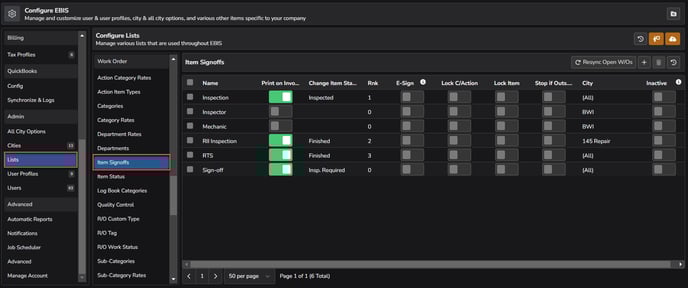
Manage the overall signoff list in **Config \> Lists \> Item Signoffs (under Work Order section)**
### Signoff Configuration
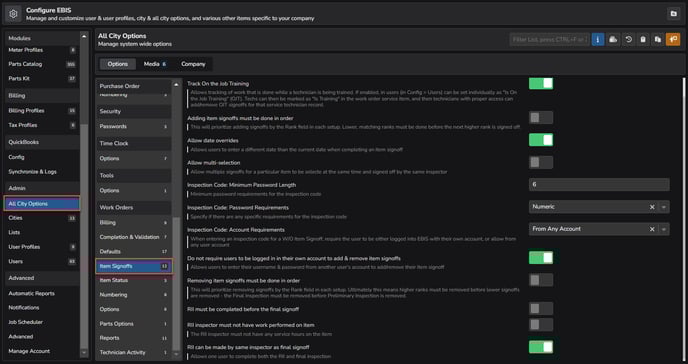
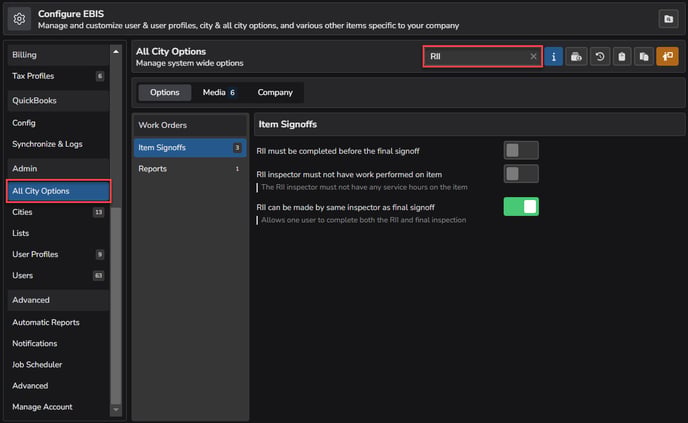
**Config \> All City Options \> Item Signoffs (under Work Orders section)** can be used to configure your final signoff & RII, along with various options.
### Permissions
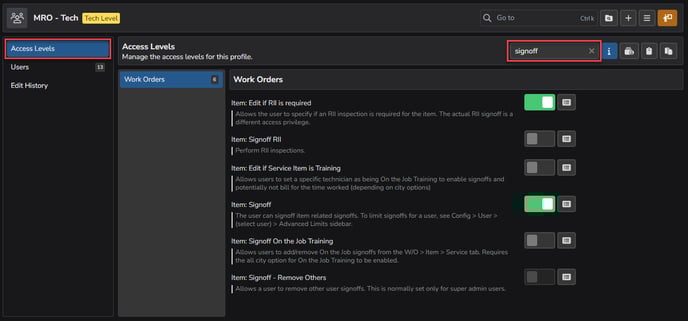
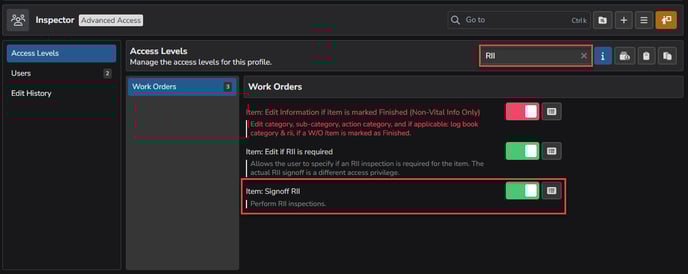
Grant signoff access via **Config \> User Profiles \> (select a profile) \> Access Levels** and use the sub-headers search bar to search directly for *signoff*.
### Advanced Permissions
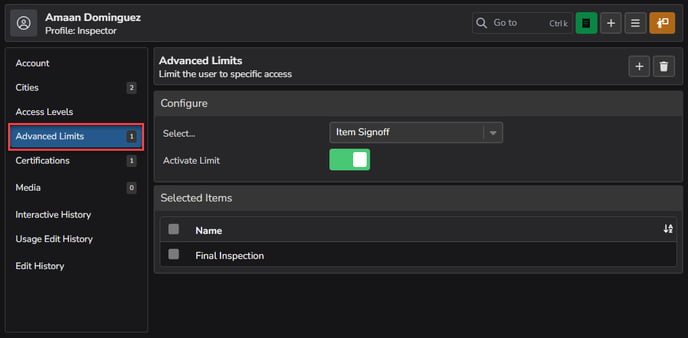
Users can be given limited permissions to signoffs by going to **Config \> Users (under Admin section) \> (select the individual user) \> Advanced Limits**, then choosing *Item Signoff* and adding the appropriate limitations.
### Configuring RII Signoffs
To configure RII signoffs, first make sure there is a signoff specifically for RII. Updates can be made by going to **Config \> Lists \> Item Signoffs (under Work Order section).**
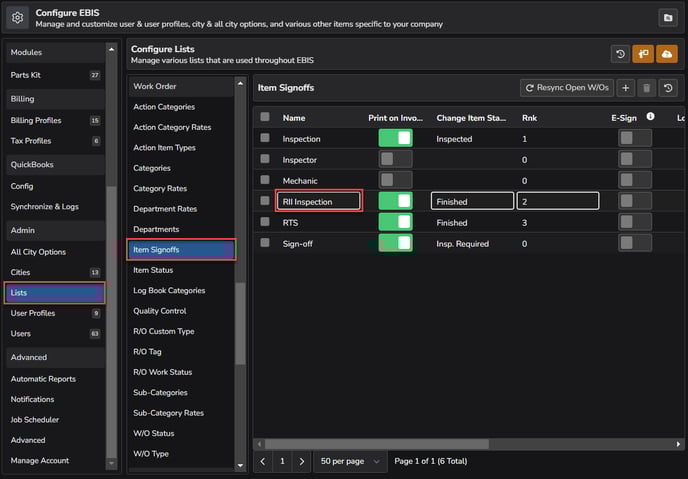
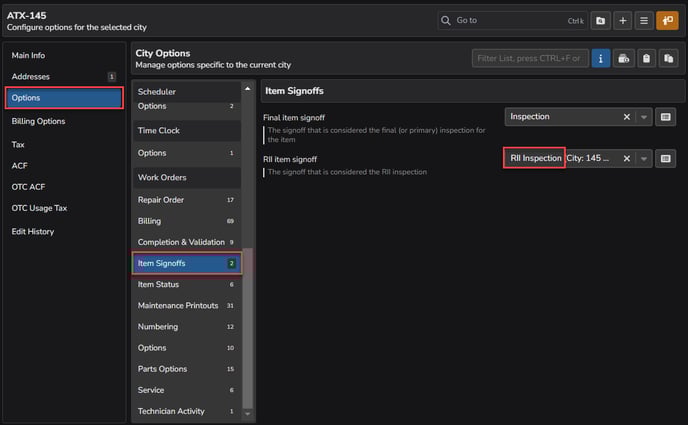
In the city specific options found via **Config \> Cities \> (select a city) \> Options \> Item Signoffs (under Work Orders section)**, make sure to set the RII item signoff to this specific item.
In **All City Options**, search for *RII* to find additional signoff settings and set any options based on your specific company requirements.
In the User Profile(s) found via **Config \> User Profiles \> (select a profile)**, enter RII in the sub-header search box and enable the *Item: Signoff RII* setting, as needed.
***Note:*** Users must have an Admin Access level user profile in order to complete an RII.
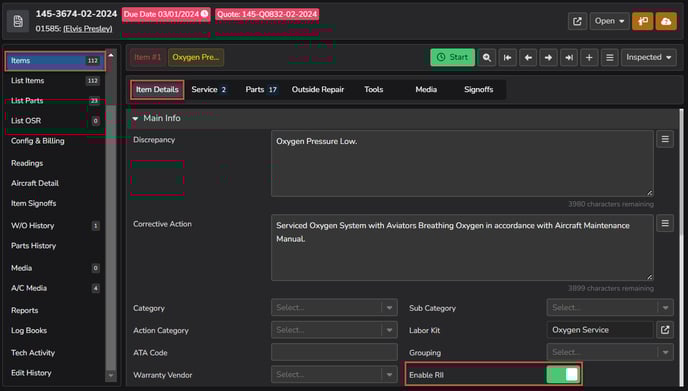
Finally, in the individual work order itself, go to **Items \> Item Details** and toggle on the *Enable RII* inspection field**.** Once set, the signoffs for this item will include the RII inspection.
### Signing Off Items
Once in a W/O with item signoffs, select the signoff(s) and use the top right icons to add or remove the signoffs.
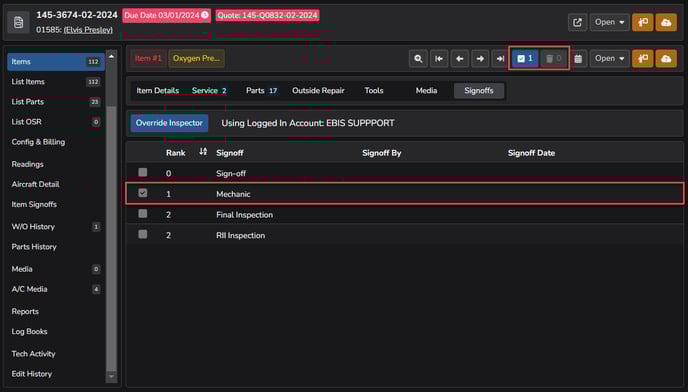
If the All Cities option to allow for date overrides is enabled, use the calendar icon  to specify the date.
- [Onboarding](https://support.ebiscloud.com/onboarding?hsLang=en#main-content)
- [All New EBIS Customers](https://support.ebiscloud.com/onboarding?hsLang=en#all-new-ebis-customers)
- [Existing Customers - EBIS 3.2 to 5 Migration](https://support.ebiscloud.com/onboarding?hsLang=en#existing-customers-ebis-3-2-to-5-migration)
- [EBIS 5 Training](https://support.ebiscloud.com/onboarding?hsLang=en#ebis-5-training)
- [MRO Specific](https://support.ebiscloud.com/mro-specific?hsLang=en#main-content)
- [Work Orders](https://support.ebiscloud.com/mro-specific?hsLang=en#work-orders)
- [3.2 to 5](https://support.ebiscloud.com/mro-specific?hsLang=en#3-2-to-5)
- [Parts](https://support.ebiscloud.com/mro-specific?hsLang=en#parts)
- [Billing](https://support.ebiscloud.com/mro-specific?hsLang=en#billing)
- [Configuration](https://support.ebiscloud.com/mro-specific?hsLang=en#configuration)
- [Cores / Rotables](https://support.ebiscloud.com/mro-specific?hsLang=en#cores-rotables)
- [Aircraft](https://support.ebiscloud.com/mro-specific?hsLang=en#aircraft)
- [Tools](https://support.ebiscloud.com/mro-specific?hsLang=en#tools)
- [QuickBooks Online Integration (New)](https://support.ebiscloud.com/quickbooks-online-integration-new?hsLang=en)
- [Work Order](https://support.ebiscloud.com/work-order?hsLang=en)
- [Customer Approvals](https://support.ebiscloud.com/customer-approvals?hsLang=en#main-content)
- [Getting Started](https://support.ebiscloud.com/customer-approvals?hsLang=en#getting-started)
- [Using Customer Approvals](https://support.ebiscloud.com/customer-approvals?hsLang=en#using-customer-approvals)
- [Customer Experience](https://support.ebiscloud.com/customer-approvals?hsLang=en#customer-experience)
- [Troubleshooting & FAQs](https://support.ebiscloud.com/customer-approvals?hsLang=en#troubleshooting-faqs)
- [Aircraft](https://support.ebiscloud.com/aircraft?hsLang=en#main-content)
- [Getting Started with the Aircraft Module](https://support.ebiscloud.com/aircraft?hsLang=en#getting-started-with-the-aircraft-module)
- [Creating & Configuring an Aircraft or Fleet](https://support.ebiscloud.com/aircraft?hsLang=en#creating-configuring-an-aircraft-or-fleet)
- [Viewing & Updating Meter Readings (Aircraft Times)](https://support.ebiscloud.com/aircraft?hsLang=en#viewing-updating-meter-readings-aircraft-times)
- [Creating & Configuring Meter Profiles](https://support.ebiscloud.com/aircraft?hsLang=en#creating-configuring-meter-profiles)
- [Reviewing Historical Work Orders, Parts & OSRs on Aircraft](https://support.ebiscloud.com/aircraft?hsLang=en#reviewing-historical-work-orders-parts-osrs-on-aircraft)
- [Managing Deferred / Continued Maintenance Items](https://support.ebiscloud.com/aircraft?hsLang=en#managing-deferred-continued-maintenance-items)
- [Managing Recurring Maintenance Items with the Compliance Module](https://support.ebiscloud.com/aircraft?hsLang=en#managing-recurring-maintenance-items-with-the-compliance-module)
- [Setting Custom Pricing & Rates for Specific Aircraft](https://support.ebiscloud.com/aircraft?hsLang=en#setting-custom-pricing-rates-for-specific-aircraft)
- [Ordering Shop Supplies Using a “Shop Aircraft”](https://support.ebiscloud.com/aircraft?hsLang=en#ordering-shop-supplies-using-a-shop-aircraft)
- [Viewing & Managing Engine Compression Readings](https://support.ebiscloud.com/aircraft?hsLang=en#viewing-managing-engine-compression-readings)
- [Aircraft Module Fields, Definitions & Config Settings](https://support.ebiscloud.com/aircraft?hsLang=en#aircraft-module-fields-definitions-config-settings)
- [Advanced](https://support.ebiscloud.com/advanced?hsLang=en#main-content)
- [Errors](https://support.ebiscloud.com/advanced?hsLang=en#errors)
- [EBis 3.2 (Legacy)](https://support.ebiscloud.com/ebis-3-2-legacy?hsLang=en#main-content)
- [Work Orders](https://support.ebiscloud.com/ebis-3-2-legacy?hsLang=en#work-orders)
- [Pricing](https://support.ebiscloud.com/ebis-3-2-legacy?hsLang=en#pricing)
- [Troubleshooting](https://support.ebiscloud.com/ebis-3-2-legacy?hsLang=en#troubleshooting)
- [GSE EAM & CMMS](https://support.ebiscloud.com/gse-eam-cmms?hsLang=en)
- [Billing](https://support.ebiscloud.com/billing?hsLang=en#main-content)
- [City Config](https://support.ebiscloud.com/billing?hsLang=en#city-config)
- [EBIS Subscription Management](https://support.ebiscloud.com/billing?hsLang=en#ebis-subscription-management)
- [Best Practices](https://support.ebiscloud.com/best-practices?hsLang=en)
- [Parts](https://support.ebiscloud.com/parts?hsLang=en#main-content)
- [Cores](https://support.ebiscloud.com/parts?hsLang=en#cores)
- [Special Pricing](https://support.ebiscloud.com/parts?hsLang=en#special-pricing)
- [ADA Dashboards & Reporting](https://support.ebiscloud.com/ada-dashboards-reporting?hsLang=en#main-content)
- [General Reporting](https://support.ebiscloud.com/ada-dashboards-reporting?hsLang=en#general-reporting)
- [ADA Dashboards](https://support.ebiscloud.com/ada-dashboards-reporting?hsLang=en#ada-dashboards)
- [Power BI Connector](https://support.ebiscloud.com/ada-dashboards-reporting?hsLang=en#power-bi-connector)
- [General Configuration](https://support.ebiscloud.com/general-configuration?hsLang=en#main-content)
- [Addresses](https://support.ebiscloud.com/general-configuration?hsLang=en#addresses)
- [Quickbooks Imports with Transaction Pro](https://support.ebiscloud.com/quickbooks-imports-with-transaction-pro?hsLang=en)
- [New Releases](https://support.ebiscloud.com/new-releases?hsLang=en)
[](https://www.ebiscloud.com?hsLang=en)
[mailto:email@email.com](mailto:email@email.com)
Copyright © 2025, EBIS - Tronair