---
title: Certification Management
description: Configuring and Administering All City, City and User Certifications
---
[Skip to content](https://support.ebiscloud.com/certification-managment#main-content)

- [Home](https://support.ebiscloud.com/)
- [Feature Release Notes](https://www.ebiscloud.com/feature_release_notes)
Open main navigation
Close main navigation
- [Home](https://support.ebiscloud.com/)
- [Feature Release Notes](https://www.ebiscloud.com/feature_release_notes)
How can we help you?
- There are no suggestions because the search field is empty.
1. [Help Center](https://support.ebiscloud.com/?hsLang=en)
2. [MRO Specific](https://support.ebiscloud.com/mro-specific?hsLang=en)
3. [Configuration](https://support.ebiscloud.com/mro-specific?hsLang=en#configuration)
# Certification Management
## Configuring and Administering All City, City and User Certifications
### Sections
1\. [Configuration Prep](https://support.ebiscloud.com/certification-managment#Prep)
2\. [Certification Usage](https://support.ebiscloud.com/certification-managment#Usage)
3\. [Configuring Certs](https://support.ebiscloud.com/certification-managment#ConfigCity)
[⚠ Config Requirements](https://support.ebiscloud.com/certification-managment#ConfigReqs)
4\. [Creating a City Cert](https://support.ebiscloud.com/certification-managment#CreateCity)
[⚠ Create Requirements](https://support.ebiscloud.com/certification-managment#CreateReqs)
5\. [Creating a User Cert](https://support.ebiscloud.com/certification-managment#CreateUser)
6\. [Sorting | Filtering](https://support.ebiscloud.com/certification-managment#Sorting)
### Certificate Configuration Prep
Before creating a Certificate you must understand the different *Record* & *Certification Types*
**Record Types**
First, Certifications they fall into to **one** of the following **3** *Record Types*:
***All Cities*** | ***City*** | ***User***
**All Cities -** The certification will be applicable to all created Cities (Typically informational only)
**City -** The certification will be applicable to specific Cities only
**User -** The certification will be applicable to specific Users, regardless of City
**Certification Types**
*Record Types* are then broken down into **one** of the **4** *Certification Types*:
**Certification** | **Training** | **Policy** | **Other**
**Certification -** This type is typically used for:
*City Record Types*: - i.e. 145 Repair Station #, FAA #
*User Record Types*:
FAA i.e - A&P, A&P IA
EASA i.e - A, B1, B2, C1
ANAC i.e - MMA Categoria A, B & C
**Training -** This type is typically used for:
*User Record Types* i.e. [OJT](https://support.ebiscloud.com/how-to-configure-on-the-job-training-ojt?hsLang=en), Internal Training
**Policy -** This type is typically used for:
*All City* | *City | User Record Types*: i.e. Substance Abuse, Overtime
**Other -** *All City* | *City* | *User Record Types*: Any
### Where are Certifications Used?
Certifications display on most Reports throughout the system. You will mainly see *City Record Type* Certs display in Report Headers & User Record Type Certs in a few Sign off locations.
*• City Record Type* certifications will be used on the follow reports by default (some defaults can be edited):
All Billing Reports • All General Reports • All Parts Forms (Except Labels) • All Maintenance Reports • All Authorized Release Certificates • All Purchase Order Primary Reports • All OTC Billing & Traceability Reports • Customer Payment History • Scheduler Report
• *User Record Type* certifications can be used on the follow reports:
Log Book Reports • Maintenance Printouts
**•** *All City Record Type* certifications are informational only
### Configuring Certification(s)
**Certification User Access Requirements** (Advanced Access Profile Type Only)
**• View**
View and track certifications, training
requirements, policies, and misc. items
**• Add**
Add certifications to the configuration, which are
then used by a city, user, or all city.
**• Edit**
Edit certification configurations
**• Delete**
Delete certification configurations
**• Add & Edit Media**
Add and edit media linked to a certification
configuration - normally used for tracking
requirements of the certification
**• Delete Media**
Delete media linked to a certification
configuration
```
EBIS 5 Path: Config ⚙ > Modules > Certifications
```
[**First See Certification Config Prep**](https://support.ebiscloud.com/certification-managment#Prep)
**TIP:**
✪ The Process of *Configuring Certifications* is the same for all *Record Types*
✔ Just ensure you review [**Config Prep**](https://support.ebiscloud.com/certification-managment#Prep)above to understand the different configuration options
**Steps** (I will be creating a City Cert in this example)
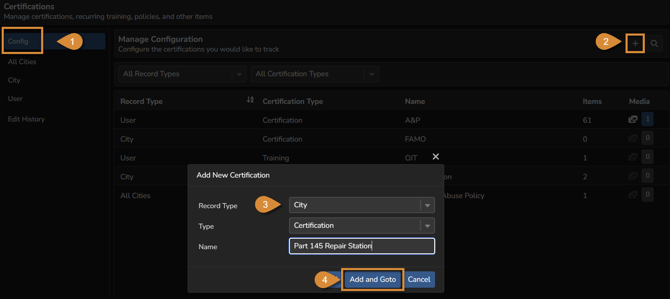
**1.** Within the *Config* section of the *Certification* Modules' select (+), choose *Record Type*, *Type* (Certification), & *Name* then select *Add & Goto*
**
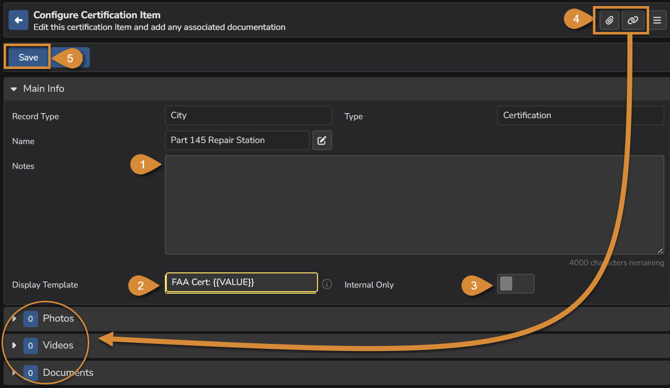
**2.** Add notes (optional), ensure the *Display Template* is set accordingly i.e FAA Cert: will display "FAA Cert:" as a verbiage prefix then will be automatically updated with the City Cert. No. once set up. (NOTE: Flagging the toggle switch as *Internal Only* will disable cert #'s created with this configuration from being shown on reports). Add any Media Files (Optional) then select *Save*.
☰ Menu within the top right is where you would delete the record
### **Creating City Certification(s)**
**Certification User Access Requirements** (Advanced Access Profile Type Only)
**• Items: Add & Edit**
Add and edit specific certifications linked to a
user, city, or all city
**• Items: Delete**
Delete specific certifications linked to a user,
city, or all city
**• Items: Media Add & Edit**
Add and edit media linked to a specific
certification for a user, city, or all city
**• Items: Media Delete**
Delete media linked to a specific certification for
a user, city, or all city
[**First See Configuration**](https://support.ebiscloud.com/certification-managment#ConfigCity)
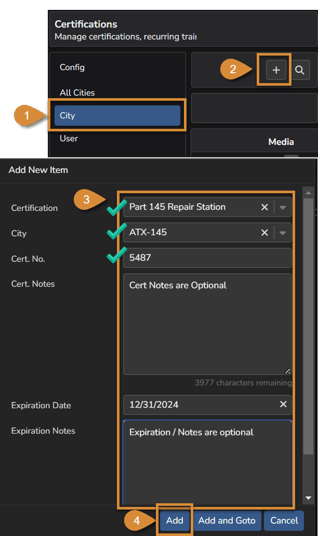
**1.** Within the *City* section of the *Certification* Modules' select (+) to add a new *Certification* for a *City* using the Configuration you just created. Enter: *Certification, City, Cert. No., Cert. Notes, Expiration Date, Expiration Notes* and then select *Add.*
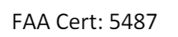
**2.** That's it, you've successfully created a *City Certification*. It will display on report headers with the rest of the *City* Details.

✪ You can add City Cert media, edit info or [delete](https://support.ebiscloud.com/certification-managment#Delete) by opening up the record within the *City* Section
### **Creating User Certification(s)**
[**See Requirements Here**](https://support.ebiscloud.com/certification-managment#CreateCity)
**First see [Config Prep](https://support.ebiscloud.com/certification-managment#Prep) & [Configuration](https://support.ebiscloud.com/certification-managment#ConfigCity)**
**1.** Within the *User* section of the *Certification* Modules' select (+) to add a new *Certification* for a *User* using the Configuration you just created. Enter: *Certification, Certification, User, Cert. No., Expiration Date, Expiration Notes* and then select *Add.*
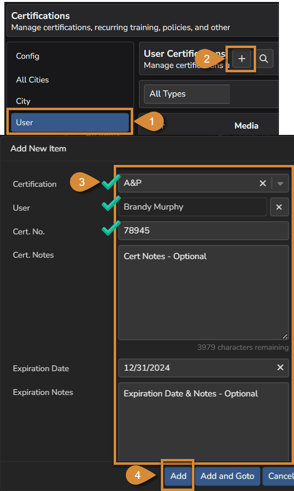
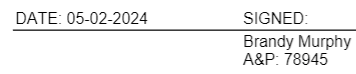
**2.** That's it, you've successfully created a *User Certification*. It will display on Log Book Reports Sign-off Blocks when selected.

✪ You can add *User* Cert media, edit info or [delete](https://support.ebiscloud.com/certification-managment#Delete) by opening up the record within the *User* section
### Sorting | Filtering
**Configuration -**
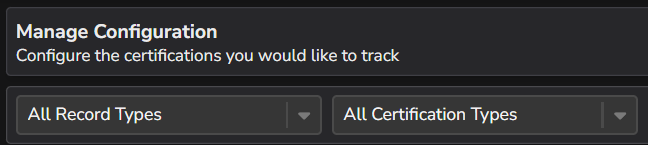
Sort & Filter By *Record Types* and/or *Certification Types*
****
**Records -** (*All City, City*)
Sort & FIlter By *Record Types* & *Expiration*

(Users)
Sort & FIlter By *Record Types* , *Expiration* & *Certification*
**
See [OJT Tracking Here](https://support.ebiscloud.com/how-to-configure-on-the-job-training-ojt?hsLang=en)
- [Onboarding](https://support.ebiscloud.com/onboarding?hsLang=en#main-content)
- [All New EBIS Customers](https://support.ebiscloud.com/onboarding?hsLang=en#all-new-ebis-customers)
- [Existing Customers - EBIS 3.2 to 5 Migration](https://support.ebiscloud.com/onboarding?hsLang=en#existing-customers-ebis-3-2-to-5-migration)
- [EBIS 5 Training](https://support.ebiscloud.com/onboarding?hsLang=en#ebis-5-training)
- [MRO Specific](https://support.ebiscloud.com/mro-specific?hsLang=en#main-content)
- [Work Orders](https://support.ebiscloud.com/mro-specific?hsLang=en#work-orders)
- [3.2 to 5](https://support.ebiscloud.com/mro-specific?hsLang=en#3-2-to-5)
- [Parts](https://support.ebiscloud.com/mro-specific?hsLang=en#parts)
- [Billing](https://support.ebiscloud.com/mro-specific?hsLang=en#billing)
- [Configuration](https://support.ebiscloud.com/mro-specific?hsLang=en#configuration)
- [Cores / Rotables](https://support.ebiscloud.com/mro-specific?hsLang=en#cores-rotables)
- [Aircraft](https://support.ebiscloud.com/mro-specific?hsLang=en#aircraft)
- [Tools](https://support.ebiscloud.com/mro-specific?hsLang=en#tools)
- [QuickBooks Online Integration (New)](https://support.ebiscloud.com/quickbooks-online-integration-new?hsLang=en)
- [Work Order](https://support.ebiscloud.com/work-order?hsLang=en)
- [Customer Approvals](https://support.ebiscloud.com/customer-approvals?hsLang=en#main-content)
- [Getting Started](https://support.ebiscloud.com/customer-approvals?hsLang=en#getting-started)
- [Using Customer Approvals](https://support.ebiscloud.com/customer-approvals?hsLang=en#using-customer-approvals)
- [Customer Experience](https://support.ebiscloud.com/customer-approvals?hsLang=en#customer-experience)
- [Troubleshooting & FAQs](https://support.ebiscloud.com/customer-approvals?hsLang=en#troubleshooting-faqs)
- [Aircraft](https://support.ebiscloud.com/aircraft?hsLang=en#main-content)
- [Getting Started with the Aircraft Module](https://support.ebiscloud.com/aircraft?hsLang=en#getting-started-with-the-aircraft-module)
- [Creating & Configuring an Aircraft or Fleet](https://support.ebiscloud.com/aircraft?hsLang=en#creating-configuring-an-aircraft-or-fleet)
- [Viewing & Updating Meter Readings (Aircraft Times)](https://support.ebiscloud.com/aircraft?hsLang=en#viewing-updating-meter-readings-aircraft-times)
- [Creating & Configuring Meter Profiles](https://support.ebiscloud.com/aircraft?hsLang=en#creating-configuring-meter-profiles)
- [Reviewing Historical Work Orders, Parts & OSRs on Aircraft](https://support.ebiscloud.com/aircraft?hsLang=en#reviewing-historical-work-orders-parts-osrs-on-aircraft)
- [Managing Deferred / Continued Maintenance Items](https://support.ebiscloud.com/aircraft?hsLang=en#managing-deferred-continued-maintenance-items)
- [Managing Recurring Maintenance Items with the Compliance Module](https://support.ebiscloud.com/aircraft?hsLang=en#managing-recurring-maintenance-items-with-the-compliance-module)
- [Setting Custom Pricing & Rates for Specific Aircraft](https://support.ebiscloud.com/aircraft?hsLang=en#setting-custom-pricing-rates-for-specific-aircraft)
- [Ordering Shop Supplies Using a “Shop Aircraft”](https://support.ebiscloud.com/aircraft?hsLang=en#ordering-shop-supplies-using-a-shop-aircraft)
- [Viewing & Managing Engine Compression Readings](https://support.ebiscloud.com/aircraft?hsLang=en#viewing-managing-engine-compression-readings)
- [Aircraft Module Fields, Definitions & Config Settings](https://support.ebiscloud.com/aircraft?hsLang=en#aircraft-module-fields-definitions-config-settings)
- [Advanced](https://support.ebiscloud.com/advanced?hsLang=en#main-content)
- [Errors](https://support.ebiscloud.com/advanced?hsLang=en#errors)
- [EBis 3.2 (Legacy)](https://support.ebiscloud.com/ebis-3-2-legacy?hsLang=en#main-content)
- [Work Orders](https://support.ebiscloud.com/ebis-3-2-legacy?hsLang=en#work-orders)
- [Pricing](https://support.ebiscloud.com/ebis-3-2-legacy?hsLang=en#pricing)
- [Troubleshooting](https://support.ebiscloud.com/ebis-3-2-legacy?hsLang=en#troubleshooting)
- [GSE EAM & CMMS](https://support.ebiscloud.com/gse-eam-cmms?hsLang=en)
- [Billing](https://support.ebiscloud.com/billing?hsLang=en#main-content)
- [City Config](https://support.ebiscloud.com/billing?hsLang=en#city-config)
- [EBIS Subscription Management](https://support.ebiscloud.com/billing?hsLang=en#ebis-subscription-management)
- [Best Practices](https://support.ebiscloud.com/best-practices?hsLang=en)
- [Parts](https://support.ebiscloud.com/parts?hsLang=en#main-content)
- [Cores](https://support.ebiscloud.com/parts?hsLang=en#cores)
- [Special Pricing](https://support.ebiscloud.com/parts?hsLang=en#special-pricing)
- [ADA Dashboards & Reporting](https://support.ebiscloud.com/ada-dashboards-reporting?hsLang=en#main-content)
- [General Reporting](https://support.ebiscloud.com/ada-dashboards-reporting?hsLang=en#general-reporting)
- [ADA Dashboards](https://support.ebiscloud.com/ada-dashboards-reporting?hsLang=en#ada-dashboards)
- [Power BI Connector](https://support.ebiscloud.com/ada-dashboards-reporting?hsLang=en#power-bi-connector)
- [General Configuration](https://support.ebiscloud.com/general-configuration?hsLang=en#main-content)
- [Addresses](https://support.ebiscloud.com/general-configuration?hsLang=en#addresses)
- [Quickbooks Imports with Transaction Pro](https://support.ebiscloud.com/quickbooks-imports-with-transaction-pro?hsLang=en)
- [New Releases](https://support.ebiscloud.com/new-releases?hsLang=en)
[](https://www.ebiscloud.com?hsLang=en)
[mailto:email@email.com](mailto:email@email.com)
Copyright © 2025, EBIS - Tronair