---
title: Accessing your data from the EBIS external API
description: You can access various data from EBIS via its external API, allowing you to pull data into Power BI, Tableau, build your own accounting integration, etc.
---
[Skip to content](https://support.ebiscloud.com/api-access#main-content)

- [Home](https://support.ebiscloud.com/)
- [Feature Release Notes](https://www.ebiscloud.com/feature_release_notes)
Open main navigation
Close main navigation
- [Home](https://support.ebiscloud.com/)
- [Feature Release Notes](https://www.ebiscloud.com/feature_release_notes)
How can we help you?
- There are no suggestions because the search field is empty.
1. [Help Center](https://support.ebiscloud.com/?hsLang=en)
2. [Advanced](https://support.ebiscloud.com/advanced?hsLang=en)
# Accessing your data from the EBIS external API
## You can access various data from EBIS via its external API, allowing you to pull data into Power BI, Tableau, build your own accounting integration, etc.
### Introduction
Depending on your EBIS license, it may be possible for you to access various parts of EBIS' data via the external API. This is commonly used to access information such as work order, purchase order, or over the counter totals, as well inventory data.
To obtain an access key, please send a request to [support@datcomedia.com](mailto:support@datcomedia.com)
### What is Available?
Please see [apidocs.ebis5.com](https://apidocs.ebis5.com) for a list of accessible API calls.
### Postman Access Example
- Determine the data point you want to use, from apidocs.ebis5.com. In this example, we will receive some work order totals.
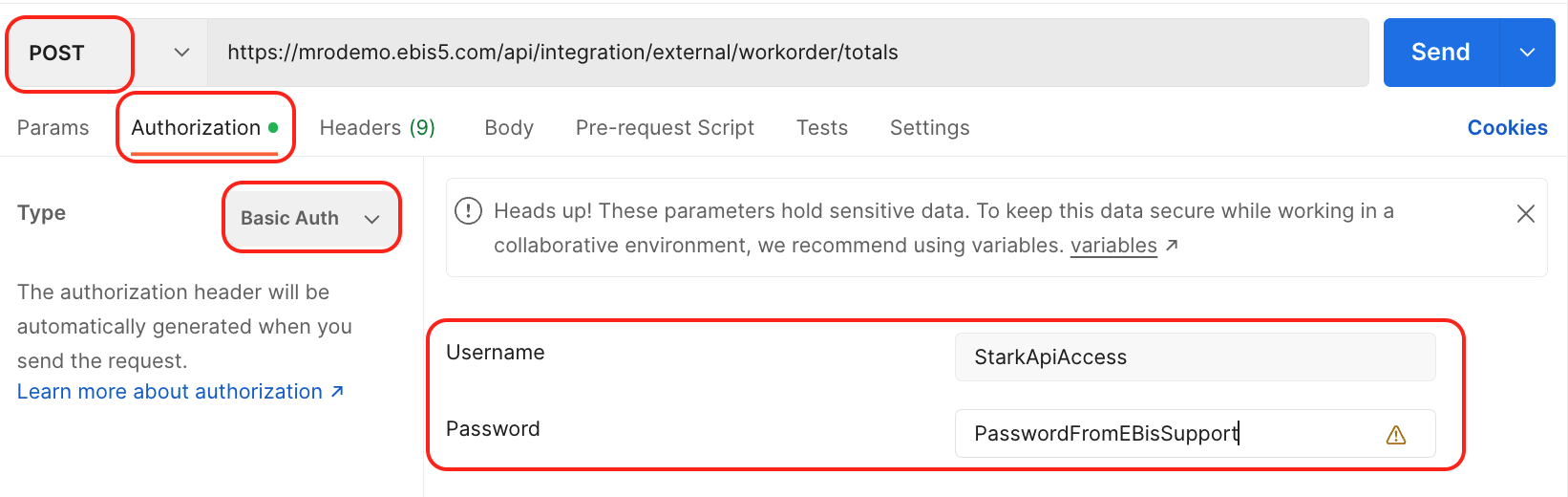
- Create a new request and set the method to POST and set the proper URL
- In Authorization, specify "Basic Auth" as the Type and set the Username and Password to the info received from EBIS support
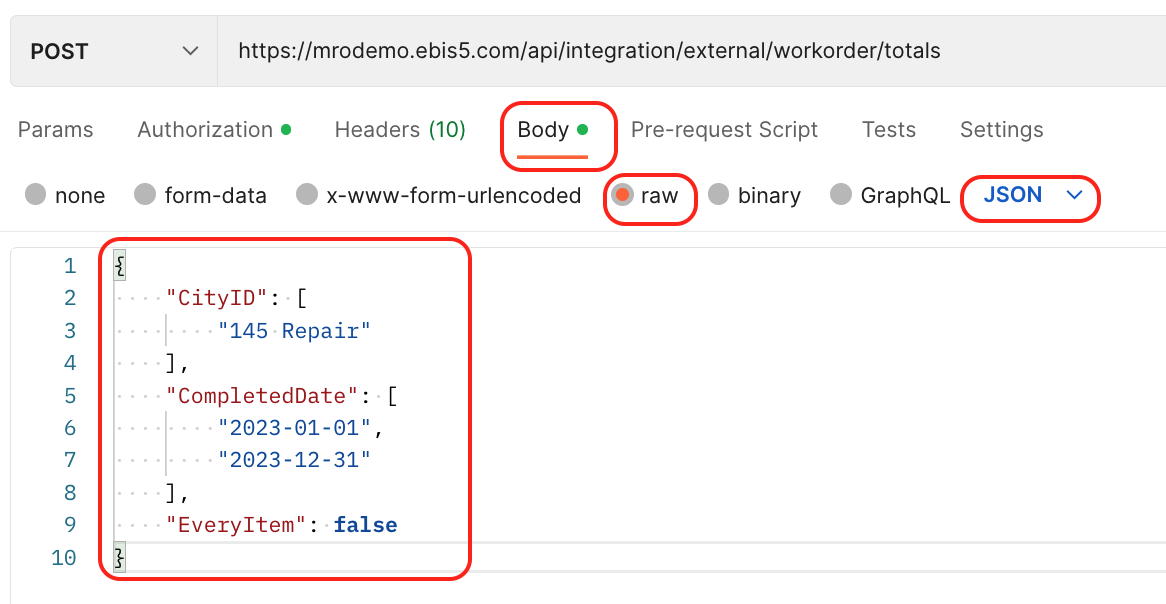
- In the Body, select Raw, JSON, and enter the parameters such as below:
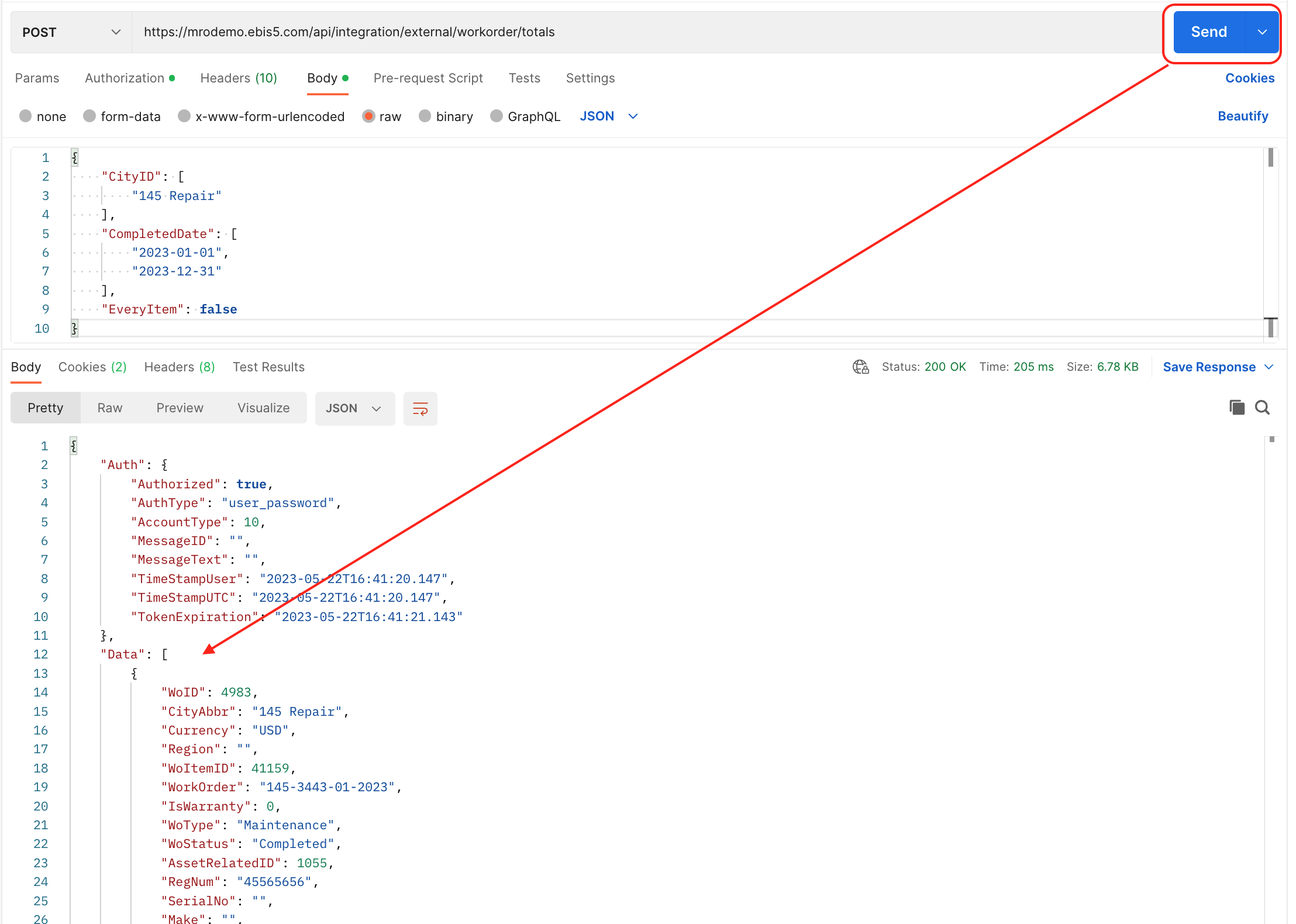
- Press "Send" to run the query, and your results will appear below in the "Data" section of the response.
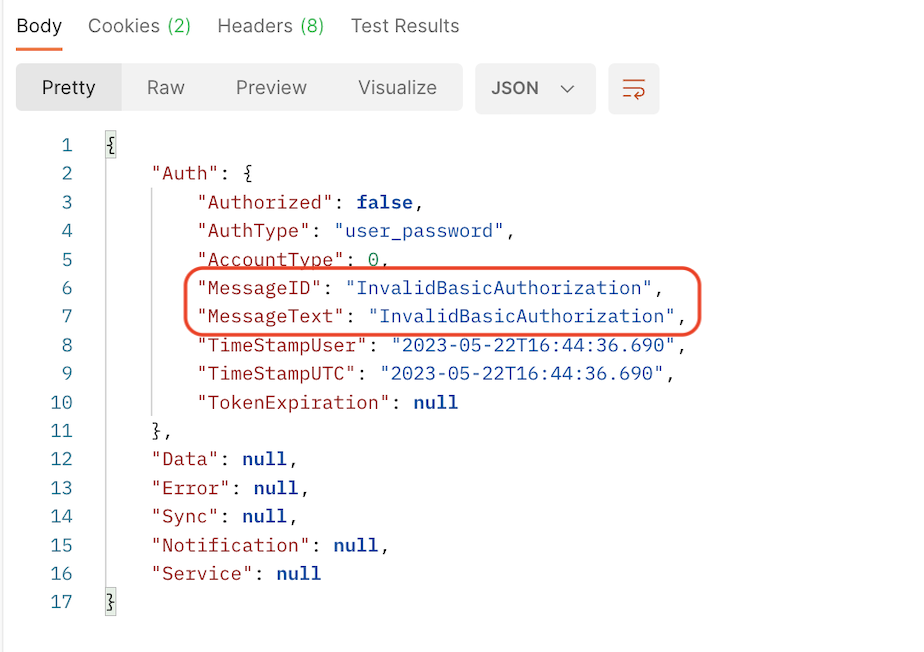
Note that if you have access errors, this will appear in the "Auth" section of the response:
If no data is found for the criteria you enter, it's common for the Data to return as a blank array: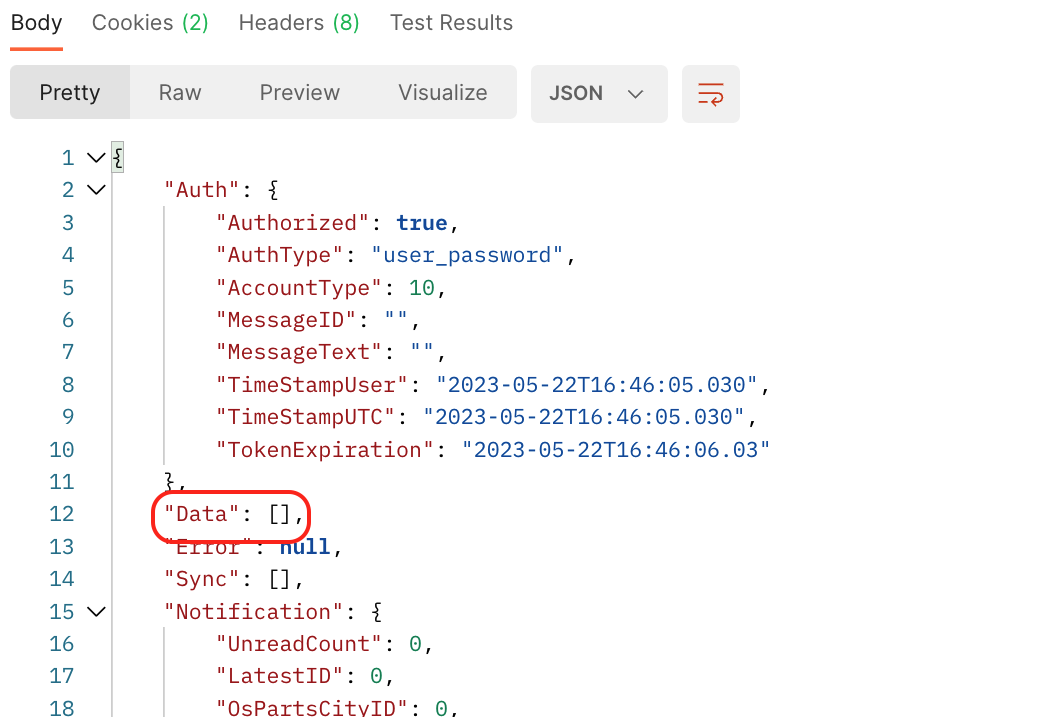
### Structure of Data
Depending on the type of data in the call and how you want to consume the data, you may have the option to output the data as either *flat* or *nested*. Please see the individual API call in the API docs for more.
### Consuming Data and Processing On Your End
Once you have accessed your data, you can incorporate this access into applications such as Power BI or Tableau.
If you are looking to do take this data, and process it accordingly and post it into another application, you may want to look at the Javascript AXIOS [example](https://apidocs.ebis5.com/?routeName=Home) on the API docs homepage.
For accounting purposes, the most commonly used calls would be:
- [Work Order Totals](https://apidocs.ebis5.com/?routeName=workorder/totals&highlights=%7B%7D)
- [Purchase Orders](https://apidocs.ebis5.com/?routeName=purchaseorder&highlights=%7B%7D)
Other Notable Items:
- [Tech Activity (Technician Logs from Work Orders)](https://apidocs.ebis5.com/?routeName=workorder/techactivity&highlights=%7B%7D)
*Note that we have additional external API calls on our roadmap for late Q2/early Q3.*
- [Onboarding](https://support.ebiscloud.com/onboarding?hsLang=en#main-content)
- [All New EBIS Customers](https://support.ebiscloud.com/onboarding?hsLang=en#all-new-ebis-customers)
- [Existing Customers - EBIS 3.2 to 5 Migration](https://support.ebiscloud.com/onboarding?hsLang=en#existing-customers-ebis-3-2-to-5-migration)
- [EBIS 5 Training](https://support.ebiscloud.com/onboarding?hsLang=en#ebis-5-training)
- [MRO Specific](https://support.ebiscloud.com/mro-specific?hsLang=en#main-content)
- [Work Orders](https://support.ebiscloud.com/mro-specific?hsLang=en#work-orders)
- [3.2 to 5](https://support.ebiscloud.com/mro-specific?hsLang=en#3-2-to-5)
- [Parts](https://support.ebiscloud.com/mro-specific?hsLang=en#parts)
- [Billing](https://support.ebiscloud.com/mro-specific?hsLang=en#billing)
- [Configuration](https://support.ebiscloud.com/mro-specific?hsLang=en#configuration)
- [Cores / Rotables](https://support.ebiscloud.com/mro-specific?hsLang=en#cores-rotables)
- [Aircraft](https://support.ebiscloud.com/mro-specific?hsLang=en#aircraft)
- [Tools](https://support.ebiscloud.com/mro-specific?hsLang=en#tools)
- [QuickBooks Online Integration (New)](https://support.ebiscloud.com/quickbooks-online-integration-new?hsLang=en)
- [Work Order](https://support.ebiscloud.com/work-order?hsLang=en)
- [Customer Approvals](https://support.ebiscloud.com/customer-approvals?hsLang=en#main-content)
- [Getting Started](https://support.ebiscloud.com/customer-approvals?hsLang=en#getting-started)
- [Using Customer Approvals](https://support.ebiscloud.com/customer-approvals?hsLang=en#using-customer-approvals)
- [Customer Experience](https://support.ebiscloud.com/customer-approvals?hsLang=en#customer-experience)
- [Troubleshooting & FAQs](https://support.ebiscloud.com/customer-approvals?hsLang=en#troubleshooting-faqs)
- [Aircraft](https://support.ebiscloud.com/aircraft?hsLang=en#main-content)
- [Getting Started with the Aircraft Module](https://support.ebiscloud.com/aircraft?hsLang=en#getting-started-with-the-aircraft-module)
- [Creating & Configuring an Aircraft or Fleet](https://support.ebiscloud.com/aircraft?hsLang=en#creating-configuring-an-aircraft-or-fleet)
- [Viewing & Updating Meter Readings (Aircraft Times)](https://support.ebiscloud.com/aircraft?hsLang=en#viewing-updating-meter-readings-aircraft-times)
- [Creating & Configuring Meter Profiles](https://support.ebiscloud.com/aircraft?hsLang=en#creating-configuring-meter-profiles)
- [Reviewing Historical Work Orders, Parts & OSRs on Aircraft](https://support.ebiscloud.com/aircraft?hsLang=en#reviewing-historical-work-orders-parts-osrs-on-aircraft)
- [Managing Deferred / Continued Maintenance Items](https://support.ebiscloud.com/aircraft?hsLang=en#managing-deferred-continued-maintenance-items)
- [Managing Recurring Maintenance Items with the Compliance Module](https://support.ebiscloud.com/aircraft?hsLang=en#managing-recurring-maintenance-items-with-the-compliance-module)
- [Setting Custom Pricing & Rates for Specific Aircraft](https://support.ebiscloud.com/aircraft?hsLang=en#setting-custom-pricing-rates-for-specific-aircraft)
- [Ordering Shop Supplies Using a “Shop Aircraft”](https://support.ebiscloud.com/aircraft?hsLang=en#ordering-shop-supplies-using-a-shop-aircraft)
- [Viewing & Managing Engine Compression Readings](https://support.ebiscloud.com/aircraft?hsLang=en#viewing-managing-engine-compression-readings)
- [Aircraft Module Fields, Definitions & Config Settings](https://support.ebiscloud.com/aircraft?hsLang=en#aircraft-module-fields-definitions-config-settings)
- [Advanced](https://support.ebiscloud.com/advanced?hsLang=en#main-content)
- [Errors](https://support.ebiscloud.com/advanced?hsLang=en#errors)
- [EBis 3.2 (Legacy)](https://support.ebiscloud.com/ebis-3-2-legacy?hsLang=en#main-content)
- [Work Orders](https://support.ebiscloud.com/ebis-3-2-legacy?hsLang=en#work-orders)
- [Pricing](https://support.ebiscloud.com/ebis-3-2-legacy?hsLang=en#pricing)
- [Troubleshooting](https://support.ebiscloud.com/ebis-3-2-legacy?hsLang=en#troubleshooting)
- [GSE EAM & CMMS](https://support.ebiscloud.com/gse-eam-cmms?hsLang=en)
- [Billing](https://support.ebiscloud.com/billing?hsLang=en#main-content)
- [City Config](https://support.ebiscloud.com/billing?hsLang=en#city-config)
- [EBIS Subscription Management](https://support.ebiscloud.com/billing?hsLang=en#ebis-subscription-management)
- [Best Practices](https://support.ebiscloud.com/best-practices?hsLang=en)
- [Parts](https://support.ebiscloud.com/parts?hsLang=en#main-content)
- [Cores](https://support.ebiscloud.com/parts?hsLang=en#cores)
- [Special Pricing](https://support.ebiscloud.com/parts?hsLang=en#special-pricing)
- [ADA Dashboards & Reporting](https://support.ebiscloud.com/ada-dashboards-reporting?hsLang=en#main-content)
- [General Reporting](https://support.ebiscloud.com/ada-dashboards-reporting?hsLang=en#general-reporting)
- [ADA Dashboards](https://support.ebiscloud.com/ada-dashboards-reporting?hsLang=en#ada-dashboards)
- [Power BI Connector](https://support.ebiscloud.com/ada-dashboards-reporting?hsLang=en#power-bi-connector)
- [General Configuration](https://support.ebiscloud.com/general-configuration?hsLang=en#main-content)
- [Addresses](https://support.ebiscloud.com/general-configuration?hsLang=en#addresses)
- [Quickbooks Imports with Transaction Pro](https://support.ebiscloud.com/quickbooks-imports-with-transaction-pro?hsLang=en)
- [New Releases](https://support.ebiscloud.com/new-releases?hsLang=en)
[](https://www.ebiscloud.com?hsLang=en)
[mailto:email@email.com](mailto:email@email.com)
Copyright © 2025, EBIS - Tronair